

Ask a browser if it can play AV1 and it almost always says yes. caniuse says 96% of browsers in use support it. In our data only 9% of the smartphone models released since 2019 decode AV1 in hardware, and among this year's models it's 28%.
That yes is true, but it doesn't say whether a chip or the CPU will do the work. You need to know which before you pay to encode another format. 51Degrees gives you the answer on the server, for every request, so you can measure the share of your own viewers with an AV1 decoder and encode AV1 when the saving is bigger than the cost.
Software decoding counts as support
Chrome and Firefox carry their own AV1 decoder and run it on the CPU when the chip has none. Safari only plays AV1 when the chip has the decoder. The 96% counts partial support and software decoding as a yes.
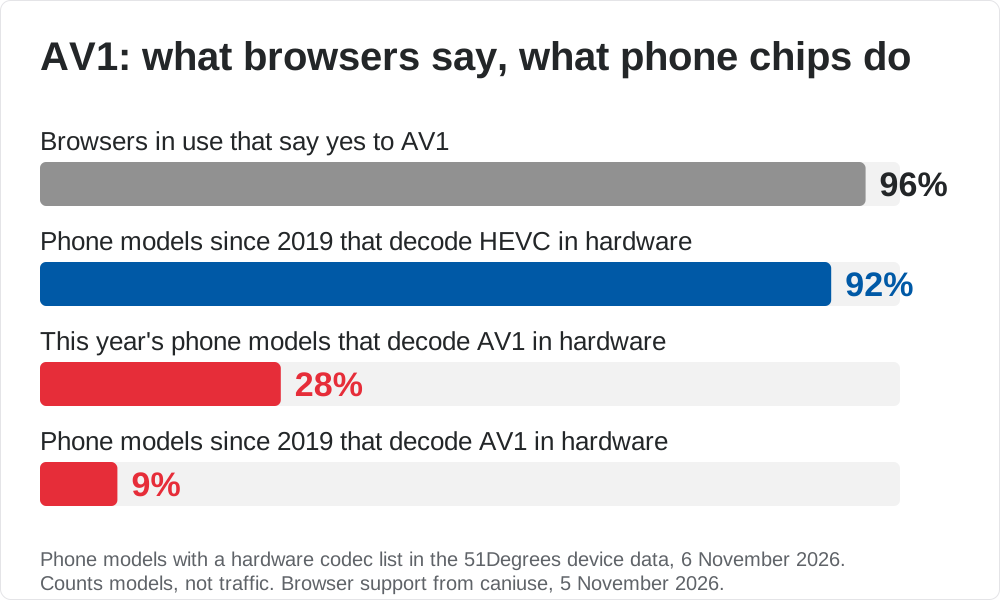
Each model is counted once however many were sold, and the browser share covers everyone on the web, so neither figure tells you your viewers' mix of devices. That's why you need to measure your own. HEVC is there for comparison, with 92% of the models released since 2019 decoding it in hardware.
Software decoding works, and at low resolutions it's fine. Netflix used the dav1d software decoder to stream AV1 to Android phones for viewers on its data saver. At 1080p and above on a mid-range phone, the CPU is doing a decoder chip's job, so the battery drains quickly and frames are dropped, with dreaded buffering the worst case. Then viewers decide your app is rubbish without ever filing a ticket.
Your player finds out too late
A player can ask its own device whether a format will play smoothly and power efficiently, through the Media Capabilities API in a browser or the operating system in a native app. That's only a hint about hardware. Every player you ship has to make that check itself, and it only gets the answer when someone presses play. By then you've already chosen which formats to encode and paid for them.
51Degrees tells you before you encode
The optimum decision about what to encode can only be made when you know how viewers' devices decode.
We've worked out which codecs each chipset decodes in hardware. SoC and SoCModel name the chipset, and HardwareVideoCodecsDecode lists the codecs it decodes in hardware.
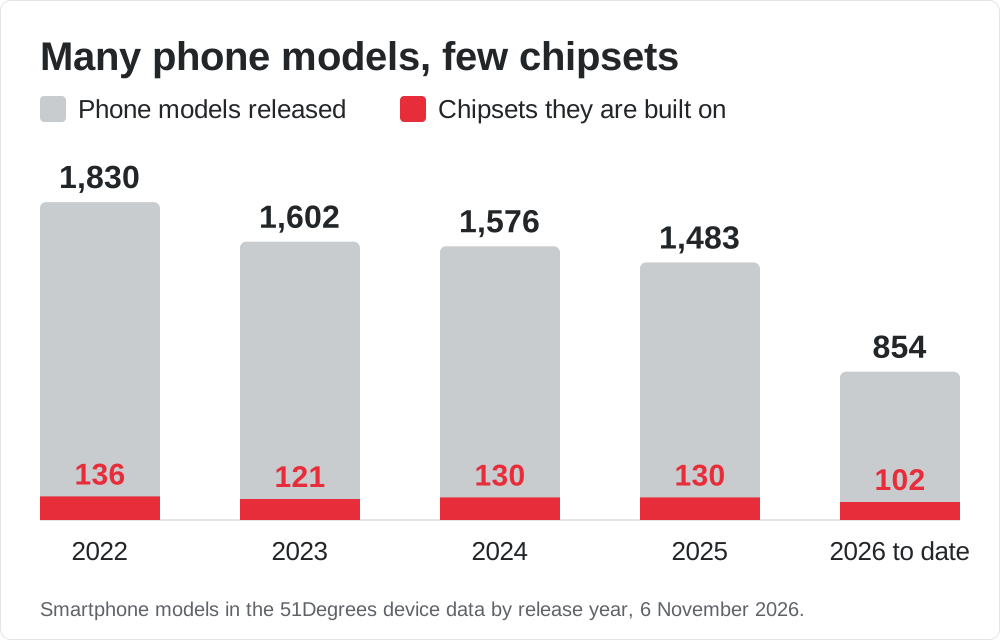
In our data each of the last four years brought 1,500 to 1,800 new phone models, built on only 120 to 140 chipsets. Once we know what a chipset decodes, we have the answer for every phone built on it, including phones that haven't launched yet.
Our data has 66 chipsets that decode AV1 in hardware today. The list gives codecs, not resolutions or bit depths, so check the highest resolution and quality you encode against the chip maker's spec.
Ad tech teams can use the same list to catch bid requests that claim to be a smart TV but list codecs that TV's chipset can't decode.

Weigh the saving against the cost
Jan Ozer's Video Codec Quick Reference Guide puts AV1 at about 62% of HEVC's bitrate for the same quality. If a quarter of your views decode AV1 in hardware, moving them from HEVC takes about a tenth off the delivery bill for that content. Software decoding saves the same bytes, at the cost of the viewer's battery.
You also pay to encode and store a second format, and splitting your CDN cache between formats means fewer requests reuse each cached copy, so you can pay to fetch the content again. If those costs swallow the saving, we wouldn't bother.
H.266 needs a native app
H.266, also called Versatile Video Coding (VVC), needs about half the bitrate of HEVC for the same quality, according to Fraunhofer HHI, one of the standard's main contributors. Ozer's guide puts an early VVC encoder at about 43% more efficient than HEVC.
Few devices can play it. In our data seven phone and tablet models decode H.266 in hardware, all on the Snapdragon 8 Elite Extreme Gen 6 and all released this year. Intel's Lunar Lake laptop chips and MediaTek's Pentonic TV chips decode it too. No mainstream browser plays H.266, caniuse has no page for it, and Android only added it to its media formats in Android 17. For now that means native apps on the few devices with the decoder.
What to do
- Add
HardwareVideoCodecsDecodeto your analytics to learn the share of your viewers with an AV1 hardware decoder. - Once enough of them have one to pay for the second format, encode AV1.
- Decide per request, serving AV1 where the chipset decodes it and HEVC or H.264 elsewhere.
- Watch the same analytics for H.266 decoders, which will show up when your viewers have them.
The codec and chipset properties are in the Pro, Pro Plus, and Bespoke plans and listed in the Property Dictionary. There's more on our Streaming TV page.